

As in every state, verifying a Texas company’s legal existence, registration status, and ownership is essential to establishing secure business relationships. Whether a financial institution is onboarding corporate customers or an enterprise is assessing new suppliers, access to reliable business information helps prevent financial and reputational risks.
A Texas business entity search enables organisations to retrieve official company records, validate submitted information, and identify discrepancies before entering into commercial relationships.
However, confirming business registration alone does not establish a company’s credibility. The nature of ownership, regulatory status and potential financial crime risks should also be evaluated.
This guide explains how to search for a business entity in Texas, where to find official databases, and how businesses can streamline verification with automated KYB solutions.
What Is a Texas Business Entity Search?
A Texas business entity search is the procedure of obtaining information on business entities that are registered in the state of Texas. It verifies commercial entities’ existence and legal status for businesses, financial institutions, investors, and compliance professionals.
Companies can search for several entity types, including:
- Limited liability companies (LLCs)
- Limited partnerships (LPs)
- Limited liability partnerships (LLPs)
- Registered foreign entities
- Corporations
- Nonprofit corporations
The search offers access to critical information for your company that is vital to business due diligence, customer onboarding, supplier verification and regulatory compliance. However, corporate details might vary depending on the registry and the entity type.
Where to Perform a Texas State Business Entity Search
Texas maintains multiple official databases for accessing business registration, taxation, and licensing information. However, each source serves a different verification purpose.
- Texas Secretary of State (SOS)
- Texas Comptroller of Public Accounts
- Texas Department of Licensing and Regulation (TDLR)
- County Clerk Offices
Moreover, instead of searching multiple official registries and records, businesses can use The KYB platform to access all the required information in one place, reducing manual effort and streamlining compliance checks.
How to Perform a Texas Secretary of State Business Entity Search
Organisations can retrieve official corporate records by following these steps.
Step 1: Access the Official Business Registry
Visit the Texas Secretary of State website and navigate to SOSPortal. Create an account or sign in to access the available business search services.
Step 2: Select a Search Method
Choose an appropriate search option based on the information available. Businesses can search using an entity name, filing number, or other supported identifiers.
Step 3: Enter Business Information
Provide the company’s registered legal name or relevant identification number. Using a unique filing number can reduce the likelihood of retrieving unrelated company records.
Step 4: Review Search Results
Identify the correct business from the available results. Compare its legal name, registration information, entity type, and availability status details against the information provided during onboarding.
Step 5: Retrieve Supporting Documents
Request additional corporate filings or certificates where necessary. The standard state business search fee is $1, while additional documents and certificates may incur separate charges.
How to Conduct a Texas Business Entity Search by Name
A Texas business entity search by name is particularly useful when an organisation does not have access to a company’s registration number.
Businesses can use either SOSPortal or the Texas Comptroller’s search facility to locate relevant company records. To improve search accuracy:
- Enter the company’s registered legal name.
- Try alternative spellings or partial names where supported.
- Distinguish between registered names and trading names.
- Review entity types and registration details.
- Cross-reference results using unique business identifiers.
Similar company names can create uncertainty during verification. Compliance teams should confirm multiple identifiers before associating a registry record with a prospective customer.
What Information Can You Obtain From a Texas Business Entity Search?
A state of Texas business entity search can provide several corporate data points that support business verification and risk assessment.
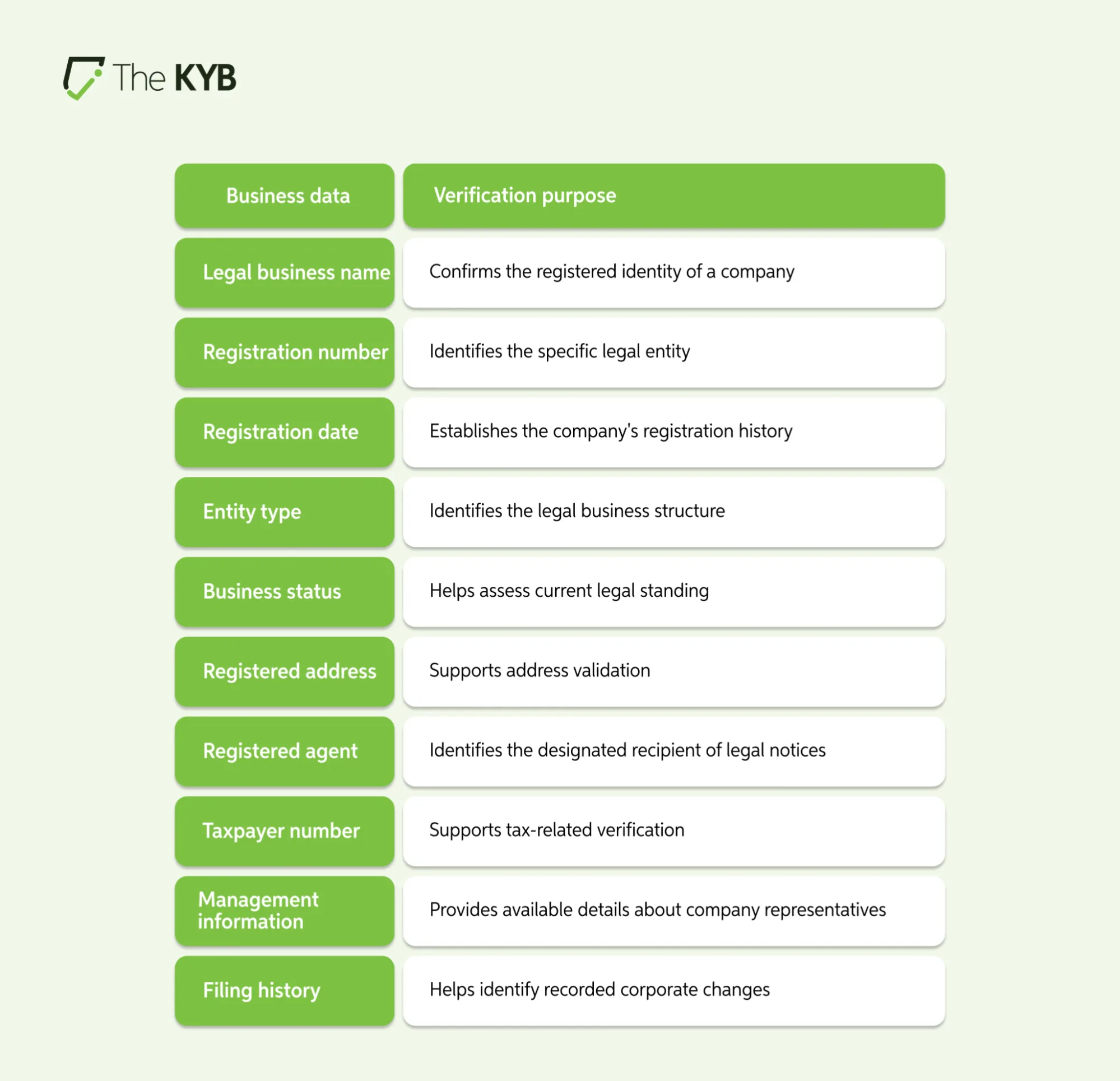
The availability of these records depends on the database, entity structure, and applicable disclosure requirements.
Understanding Texas Business Entity Status
When conducting a business entity search in Texas, organisations should carefully interpret the status displayed in official records.
Common status descriptions may include:
| Status | Meaning |
| Active | The entity maintains an active status in the relevant records. |
| Forfeited | The entity has lost certain rights due to applicable compliance failures. |
| Terminated | The entity’s legal existence or registration has ended. |
| Withdrawn | An out-of-state entity has withdrawn its Texas registration. |
| Inactive | The entity is no longer classified as active in the relevant database. |
Registration status and franchise tax account status are distinct. Compliance teams should check both where relevant to establish a more comprehensive understanding of the company’s standing.
Challenges of Manual Business Entity Search in Texas
While official registries offer important data about companies, manual verification presents a few operational challenges.
- Scattered Data Bases: Registration, tax, licensing, and ownership information may be distributed across separate databases.
- Limited Ownership Transparency: Public records may not disclose complete ultimate beneficial ownership structures.
- Manual Processing Delays: Repeated searches and document reviews increase onboarding workloads.
- Changing Business Information: A company may undergo ownership, management, or registration changes after its initial verification.
- Limited Financial Crime Insights: Registration databases do not provide or allow comprehensive sanctions, politically exposed person (PEP), or adverse media screening.
These constraints make automated verification particularly valuable for organisations onboarding businesses at scale.
Simplify Texas Business Entity Search With The KYB
The KYB enables organisations to access business information from official Texas data sources and consolidate corporate verification within a single onboarding workflow.
Compliance teams can access all the data presented by a company that they need to conduct financial crime screening, evaluate ownership structures, and get access to all of the data available from a variety of sources, all within one platform.
The KYB supports:
- Real-time business registry searches
- Company registration and status verification
- Ultimate beneficial ownership identification
- Corporate document retrieval
- Sanctions, PEP, and adverse media screening
- Ongoing business monitoring
- API-based verification and integration
With coverage across 250+ countries and states, The KYB helps organisations streamline domestic and cross-border business verification while reducing manual workloads and strengthening risk management.
Verify Texas businesses with greater confidence. Get started with The KYB.
Frequently Asked Questions
How do I Search for a Texas Business Entity?
Visit the Texas Secretary of State’s SOSPortal or the Texas Comptroller’s Franchise Tax Account Status Search and enter the available company identifiers.
Is a Texas Business Entity Search Free?
The Texas Comptroller offers free taxable entity searches. Secretary of State business searches generally carry a $1 statutory fee.
Can I Search for a Texas Business Entity by Name?
Yes. Both official platforms support company name searches. Additional identifiers help distinguish businesses with similar names.